
How to Modernize an Outdated Website with AI
A step-by-step guide to rebuilding an outdated website with AI. Learn how to migrate your content and update the design just by talking to AI.

Introduction
Modernizing an outdated website used to be a laborious process that required a web designer, thousands of dollars, and weeks of back-and-forth. New AI tools like Repaint make that process dramatically easier. You can rebuild a website simply by sharing the URL and describing what you want.
In this guide, I'll explain how you can modernize any outdated website by talking to AI. All you need is the link to your existing website. You don't need a developer or access to the original website code.
Modern Web Design

Web design constantly evolves, so it only takes 5 to 10 years for a website to look like it's from a different era. Everyone can tell when a website looks old, but it can be hard to explain why. Before we get into the process, let's talk about what it actually means for a website to look modern.
Over the last couple decades, websites have essentially evolved from looking like newspapers to magazines. They're more focused and artistic now, instead of being dense and informational. Everything is pushing toward simplicity, usability, and conversion. To be specific:
- Content is less dense. Websites used to fill every inch with content. Homepages used to be like directories for the whole site, with multiple columns of content. Modern pages usually emphasize one idea at a time. They have more sections and scroll more, which is easier to use on mobile. There's a lot more empty space so each screen has a clear focus.
- Layouts are less boxy. Older sites used to look like a mosaic of boxes. They had obvious rectangles and borders for each section, sidebar, tab, and navigation bar. On newer websites, sections flow together more seamlessly. There's often nothing but empty space between different parts of the design.
- Everything is mobile-friendly. Websites used to be designed for one standard monitor size. Now everything needs to be responsive, which means it smoothly adapts to look good on phones, tablets, and desktops.
- Text is more expressive. Older websites treated text mostly as informational, like it was a PDF document. Headlines were only slightly larger than other text, and often the same font. On modern sites, text size and fonts serve the visual composition. It's now common for websites to have headlines that are 5-10x bigger than body text.
- Navigation is simpler. Older websites exposed most of their structure through large navigation menus, sidebars, and long lists of links. Modern websites show fewer choices at once, revealing additional links when you hover or click, or directing visitors to focused landing pages with more options. Modern websites often only have 5-8 links in the top navigation even if they have thousands of pages.
Fully modernizing an old site usually requires rebuilding it, which is a huge barrier if you have years of content in it. Luckily, AI tools can help you modernize your website without starting from scratch.
How AI Can Help
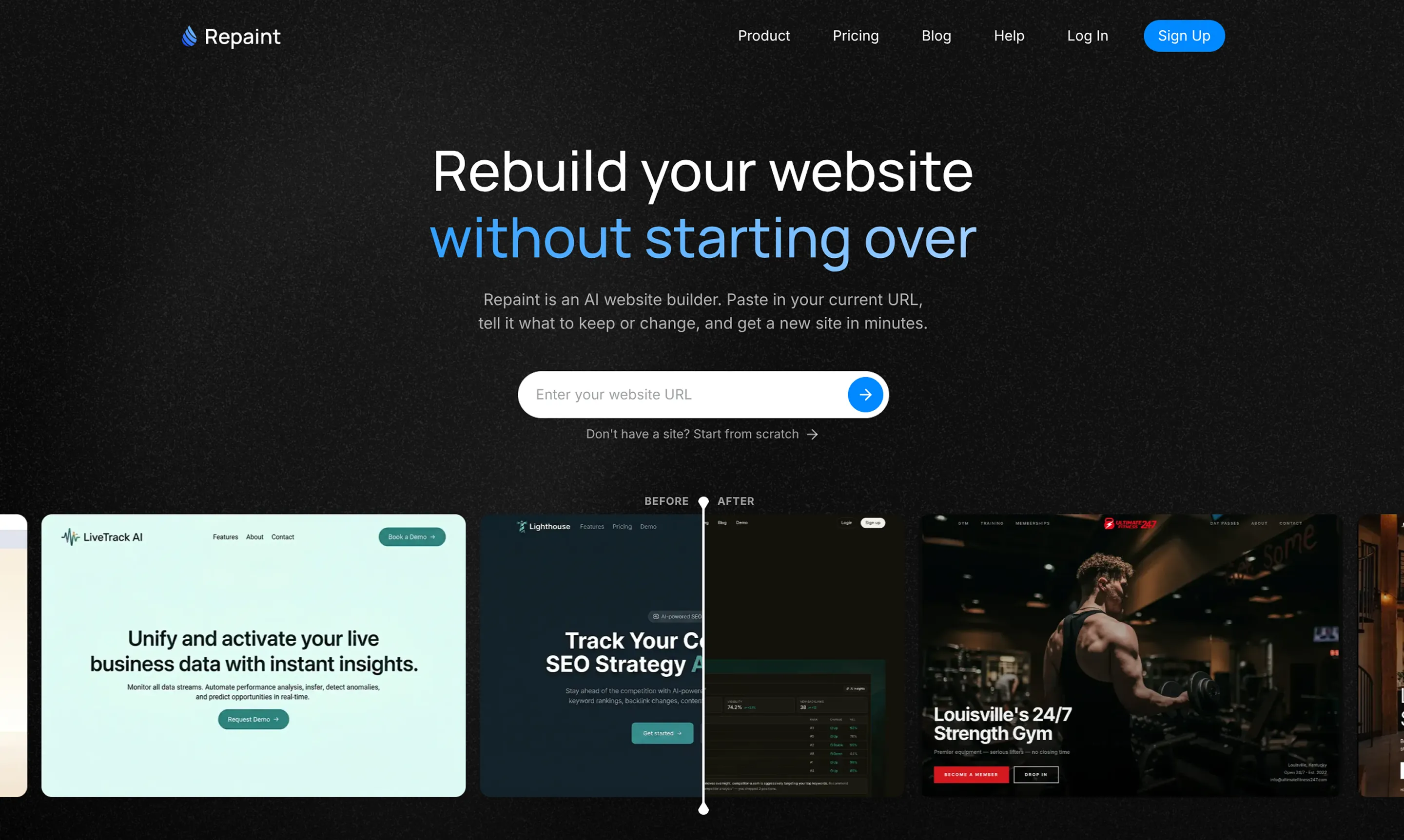
Migrating Content
Modernizing a website gets painful when the old site has years of useful content trapped inside it. The design may be outdated, but much of the information is still valuable. That is what turns a redesign into a migration project. You want a site that feels new without manually rebuilding every page from scratch.
AI tools like Repaint can handle the migration work for you. You give it the URL of your existing website, then describe what you want to change. From there, it will generate a new website for you and automatically import all the content from your existing website. Beyond just transferring the content, it can also reshape it to fit into a modern website layout.
Repaint works on any website, regardless of how it was made, because it works by visiting the live website the same way a person would. It reads the text, downloads the images, and takes screenshots. Then it uses that information to rebuild the site in a new platform. As long as the site is publicly accessible, it doesn't matter if your site was made with WordPress, Wix, or custom code.
Editing Your Website
Once your website has been rebuilt, you can keep editing it by talking to AI. There's no need to manually adjust everything, edit code, or work with a developer. You can change anything by describing the change you want in plain English. Repaint understands the request, updates the site, and gives you a new version to review.
This matters because the website is no longer locked behind technical work. You do not need to know how the site is built or where a specific setting lives. You can focus on the outcome you want, and the AI handles the implementation. That makes it much easier to improve the site after the first version is generated.
AI Guidance
Repaint can also serve as a collaborative partner to design your site. It can help you design your new site by organizing your pages, writing text, and creating style samples. And it can also guide you through technical work, like adding embeds, optimizing SEO, and connecting your domain. The AI can explain what needs to happen, then handle the work for you.
This is especially helpful because it saves you from learning dozens of web design skills. It's like having a personal web design expert, which makes it the simplest way to modernize a website.
The Process
Repaint lets you rebuild your website separately from the original, so there is no risk of disrupting the live site while you work. You can generate the new version, review it, and make the switch only when you are ready.
1. Paste Your URL
Start by pasting the URL of your existing website into Repaint's redesign tool. It will visit the live site, read its content, and download the images it needs to rebuild it. You do not need access to the original code or website builder.
2. Plan Your New Website
Next, Repaint will ask what you want the new website to become. You can preserve the existing structure or use this opportunity to reorganize it. Repaint will turn the conversation into a plan for you to review before it starts building.
3. Generate Your Website
Once Repaint is clear on what you need, it will generate the website. It uses the content from your old site while applying the new structure and design you discussed. When it finishes, you can open a working preview and see how everything came together.
4. Make Adjustments
You can change the new website by describing what you want in plain English. Start with broad changes to the overall design before polishing individual pages. Repaint updates the site after each request, so you can continue refining it until it feels right.
5. Publish
When you are happy with the result, click Publish. Repaint will put the new website online at a temporary Repaint address. Your original website remains unchanged, so you can test and share the new version before replacing anything.
6. Migrate Your Domain
The final step is connecting your existing domain to the Repaint website. This is a Repaint Plus feature. You can learn more about pricing here. You usually do not need to move the domain away from its current registrar. You only need to update its DNS settings, and Repaint can walk you through the process. Once the connection is verified, visitors will see the new website at the same address.
Conclusion
Modernizing an outdated website used to mean rebuilding everything by hand. AI changes that by letting you start with the website you already have. Repaint can bring over the existing content, help you rethink the design, and build a new version through conversation.
You do not need to prepare a detailed brief or understand how the original site was built. Paste in the URL, explain what you want, and start shaping the new website. What used to take weeks can now happen in a single afternoon.
FAQ
Which website platforms can Repaint modernize?
Repaint can modernize websites built with any website platform, like WordPress, Wix, or Squarespace. It works from the published website rather than relying on a platform-specific export capability. As long as Repaint can visit the site, it can use the existing content as the starting point for a new version.
Does Repaint work with custom-coded websites?
Yes. Repaint can rebuild a custom-coded website from its live URL the same way it rebuilds a site made with a website builder. It reads the text, downloads the images, and uses screenshots to understand the design. It will not automatically transfer backend functionality that visitors cannot see. If the original site has a database or other custom infrastructure, that functionality will need to be handled separately.
Do I need access to the original code or admin account?
No. You only need the public URL to import the website and start rebuilding it. Repaint does not need access to the original code, hosting account, or website admin panel. You will need access to your DNS settings when you are ready to connect the existing domain. If an agency controls your domain, you may need to ask them for the login information or have them make the DNS changes for you.
Can I keep my existing content and images?
Yes. Repaint can import the text and images from the existing website, including large collections of blog posts. You can keep the original content, rewrite it, or use it as context for an entirely new page. The main things that don't transfer seamlessly are backend integrations for app logic and complex animations. You can create animations in Repaint, but they likely won't be in your first version.
Can AI reorganize my pages during the redesign?
Yes. Repaint is not filling your content into a fixed template. It generates a custom website and can use your existing content in whatever structure makes sense for the new design. You can ask it to closely recreate the original site or completely rethink the page structure. It can also combine old pages or create new ones from information already on the website.
What happens to my existing website when I modernize it?
It stays live until you're ready to transfer. Repaint builds the new website separately while the original stays online and untouched. Visitors will continue seeing the old site until you decide to connect the domain to the Repaint version. There is no point where you are forced to replace the original. You can review the new site first and keep making adjustments until you are ready.
Will modernizing my website affect its SEO?
Not if you keep the important URLs and content consistent. Google builds rankings for individual pages, so changing or removing their URLs can cause them to lose the search history they have already earned. You can ask Repaint to compare the URLs on the new website with the original and fix anything that changed or went missing. To learn more, see our guide on redesigning a website without losing SEO traffic.
Can I keep my existing domain name?
Yes. You usually do not need to transfer the domain away from its current provider. When the new site is ready, you update the DNS settings so the domain points to Repaint instead of the old website. Custom domains are a Repaint Plus feature. If an agency currently manages the domain for you, they will need to provide access or make the change on your behalf.
How long does it take to modernize a website with AI?
The first build usually takes a few minutes to plan the site, import the content, and generate the new version. Larger websites can take ten minutes or more when they have many pages or a lot of content to scrape. After that, the timeline depends on how many adjustments you want to make. Most websites can be rebuilt and polished in a single afternoon.
How much does it cost to modernize a website with Repaint?
It is free to import your website, edit it, and publish it to a sites.repaint.com address. The free plan includes a weekly editing allowance and adds a Repaint badge to the website. Repaint Plus costs $20 per month when billed annually or $25 per month when billed monthly. It includes a larger usage allowance, removes the badge, and lets you connect a custom domain. By comparison, hiring an agency to modernize a website commonly costs thousands or tens of thousands of dollars and can take several weeks or months.


